Introducing IELTS Prep: the group tracker we wanted for our own exam
A tour of everything that's live today — twelve weeks of curriculum, real band conversion, error diagnosis, mocks, streaks — plus an honest list of what's still being built and what hasn't been started.
- Product
- Release notes
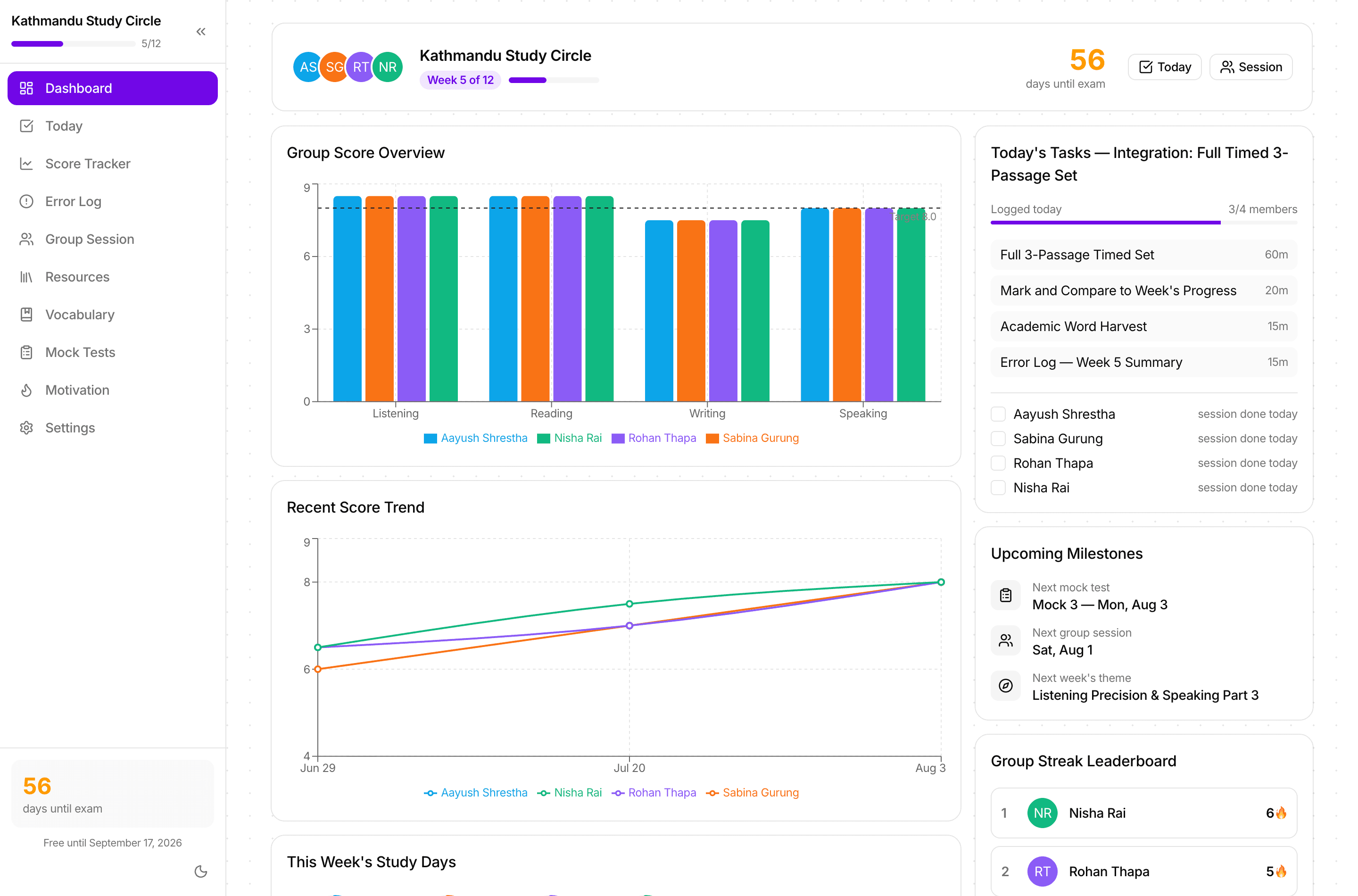
Most IELTS tools are built for one person studying alone. That's a strange assumption, because almost everyone we know who actually got the band they wanted did it alongside two or three other people sitting the same exam on the same day.
So this is the other thing: a shared 12-week program for a group of two to six friends, with one exam date, one curriculum, one set of charts, and enough visibility that skipping a day is mildly awkward. One person sets the group up and gets an access code; everyone else signs up, joins with that code, and builds their own profile.
Below is everything that works today, then everything that doesn't yet. The second list is deliberately as detailed as the first — if you're going to hand your friends a tool for the next three months, you should know exactly where its edges are.
What's live today
All of this is built, in use, and synced live across every member's account. Nothing in this section is a mockup.
The program itself
A 12-week, day-by-day curriculum
Not a syllabus PDF — every single day has its own tasks, instructions, time estimates and resource links, built around real Cambridge IELTS test references (books 17 through 21).
Today
Your program day is worked out from the group's start date, so there's nothing to pick. A checklist, a study timer, the ability to push a task to tomorrow, and a check-in message generator for your group chat.
Automatic week tracking
Week 1 through 12 advances on its own from the start date, with a manual override in Settings for the week everyone gets ill or goes on holiday.
Resources library
Curated official practice tests, websites, YouTube channels and apps for every section — filterable, and you can favourite the ones your group actually uses.
Measurement you can trust
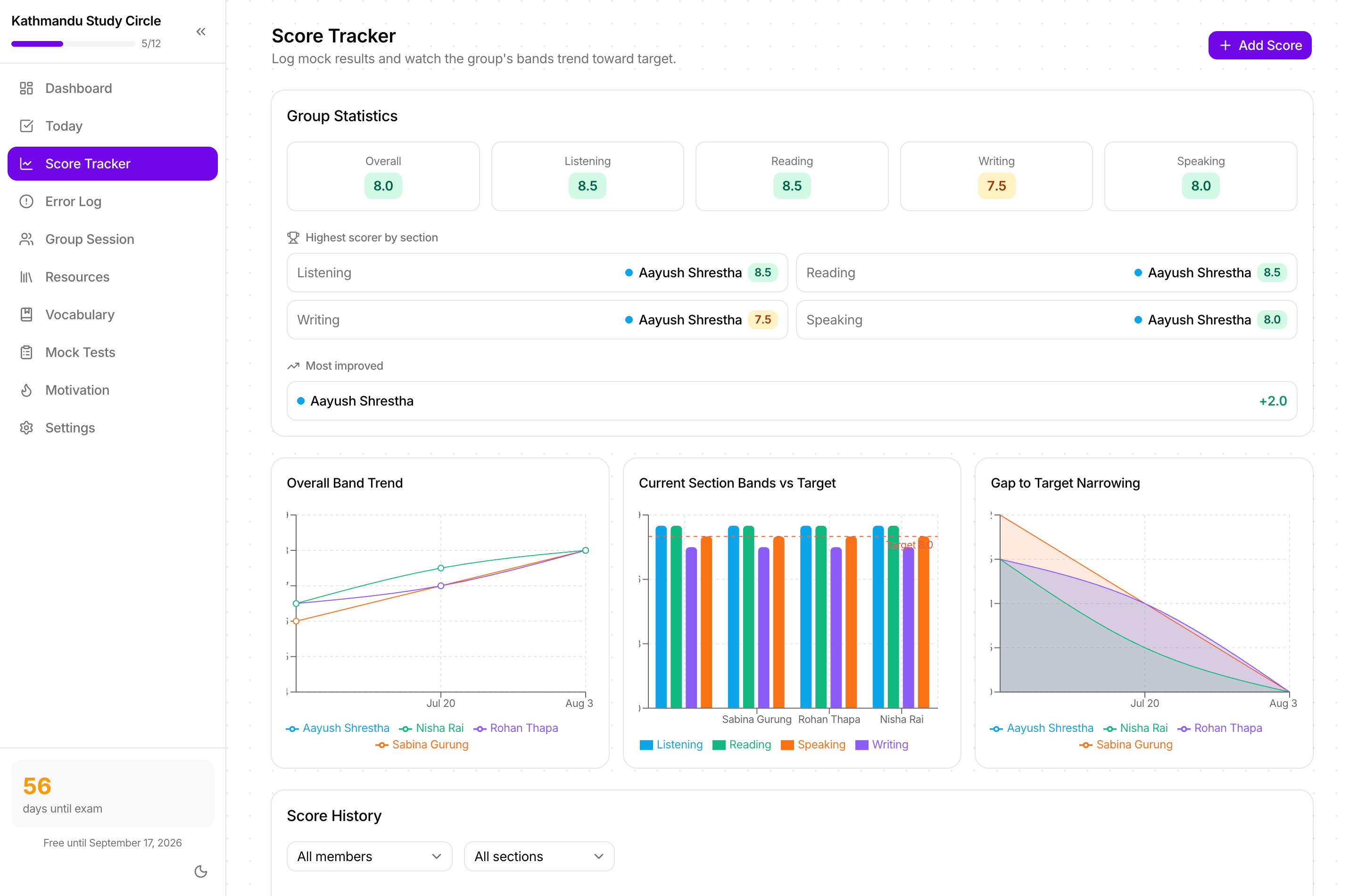
Score Tracker with real band conversion
Log diagnostics, section practice and full mocks. Raw scores convert to bands using the official Listening and Academic Reading conversion tables — the same tables are printed on the home page so you can check our work.
Trend and gap-to-target charts
The group's overall band trend, current section bands against target, and a gap-to-target chart per member — so you can see who's closing the distance and who's stalled.
9 scheduled mock tests
A fixed schedule across the 12 weeks mapped to actual Cambridge books and tests, with an exam-conditions checklist and a view of who's completed which.
A digital mock timer with auto-scoring
Walks Listening, Reading and Writing with real timings, captures your answers section by section, then converts the raw score to a band automatically.
Group mock coordinator
For taking the same mock at the same time as everyone else, then comparing results side by side afterwards.
Diagnosis, not just scores
Error Log with root causes
Every wrong answer gets logged with why it was wrong — timing, distractor, spelling, misread instructions, vocabulary, carelessness — not just that it was wrong.
Error-pattern charts
Where the group is actually losing marks, by section and by cause. After three weeks this is the most useful screen in the app: it tells you what to practise next.
Recurring-error detection and a "never again" list
Mistakes you've made more than once get surfaced and can be pinned. That pinned list is the single best thing to reread in exam week.
Per-member detail pages
One member's whole picture: band progress per skill, score history, error breakdown, vocabulary stats, study hours and weak areas.
The parts that keep people showing up
Streaks with a contribution heatmap
Current and longest streak per member, on a shared board. The heatmap makes a quiet week impossible to misremember.
Weekly challenges and milestones
One shared, specific target per week, plus program milestones — with confetti, because you should get something for hitting them.
Group session runbook
A block-by-block agenda with timings for your weekly session, a spin-the-wheel speaking topic picker so nobody pre-prepares, the official peer-review rubric, and a session log with history.
Weekly reflection journal
Two minutes a week: what moved, what didn't, what changes next week.
Vocabulary with spaced repetition
A shared bank pre-loaded with 100 Band 7–9 words across 10 IELTS topics, a daily review queue, and a topic-coverage chart so no topic gets neglected.
The boring foundations
Real accounts and live multi-device sync
Email/password or Google sign-in. Everything is stored server-side, so your progress follows your login to any device and everyone sees the same data instantly — no exporting, no manual refresh.
Access-code groups with self-service profiles
One code gets your friends in. Each person fills in their own name, role, colour and starting bands — nobody types anyone else's details.
A guided tour of the whole app
A hands-on walkthrough that points at exactly what to click, shows how many steps are left, and waits for each page to load instead of running ahead of you. Replayable from Settings for every new member.
Export, import and scoped resets
Full JSON export as a backup, import to restore, and targeted resets for the error log, vocabulary or scores individually. Plus a one-click sample-data seeder if you just want to see the app populated.
Light and dark themes
Because half of this work happens after 10pm.
What's being built now
These are the current gaps we're actively closing. They're in progress, which means they're not in your hands yet — plan your 12 weeks as if they don't exist.
Writing task tracking against the official rubric
The peer-review rubric exists inside the group session today, but there's no dedicated place to log a Task 1 or Task 2 attempt, record the four criterion scores, and watch them trend like the other sections do.
A speaking practice log
Somewhere to record which Part 2 topics you've actually rehearsed, how long you spoke for, and what feedback you got — so speaking stops being the skill that only gets attention on Saturdays.
Reminders for the daily log
The daily log is the highest-leverage habit in the app and the easiest to forget. A gentle nudge at a time you choose is the obvious fix.
A better mobile experience
Every page works on a phone today, but several were designed desktop-first. Installability and offline reading of the day's tasks are part of this work.
What's on the list after that
Nothing here has been started. It's a roadmap, not a promise, and it has no dates attached on purpose — this is being built slowly, alongside real exam prep.
Band prediction from your trend
A projected exam-day band with an honest confidence range, based on your own logged history rather than a generic curve.
More than one exam cycle per group
For groups where someone re-sits: keep the history, start a fresh 12 weeks, and compare the two runs.
A weekly digest
One email or message per week summarising what the group did, who's on a streak, and what the error charts changed their mind about.
A tutor view
Read-only access for a teacher or mentor, so the feedback they give lands in the same place the practice is tracked.
Question-type drill packs
Short targeted sets for the specific question types your error log says you keep losing marks on — matching headings, multiple-choice distractors, sentence completion.
What we're not going to build
One deliberate omission, so nobody waits for it: there will be no automated Writing or Speaking examiner producing a band score. A confident, wrong Band 7 is worse for your preparation than an honest blank — it teaches you to trust a number that the real examiner won't agree with. Rubrics, structure and somewhere to record real human feedback, yes. A robot examiner, no.
What it costs
Free during launch
Everything above is free until the launch date on the pricing page. After that, Full Access is a one-time payment per exam cycle rather than a subscription — priced to be split across a group and forgotten about, not to be cancelled later.
If you're starting a group
Set it up before week 1, not during it. Agree the exam date, pick your weekly session slot, and have everyone log one diagnostic score in the first few days — without a real starting point the charts can't tell you anything for a month.
Then it's four rhythms: a daily loop, a weekly session, nine mocks, and a taper. The how-to-use-it page walks through each one with timings.
Fifteen tracked minutes a day beats three forgotten hours a week. The whole app is built around making the small daily thing impossible to forget and slightly awkward to skip.